

It is 8:10 on a Tuesday and you are three tabs deep before your coffee is warm. Follow Up Boss has two Zillow leads from overnight. Your dialer has a voicemail you have not heard. Calendly emailed about a showing that is not on your calendar yet. Five tools open, all paid for, and a buyer who filled out a form at 11pm still has not heard a word.
The problem is not that you are lazy about follow-up. It is that follow-up lives in six places that do not talk to each other, so it never happens on time. Every tool you bought to fix a leak opened a new one, because each is a separate login, inbox, and thing to remember. This post collapses that mess into one system: the six stages every lead moves through, with the copy, timing, and failure points for each.
Table of contents
- What all these tools are actually costing you
- The six stages every lead moves through
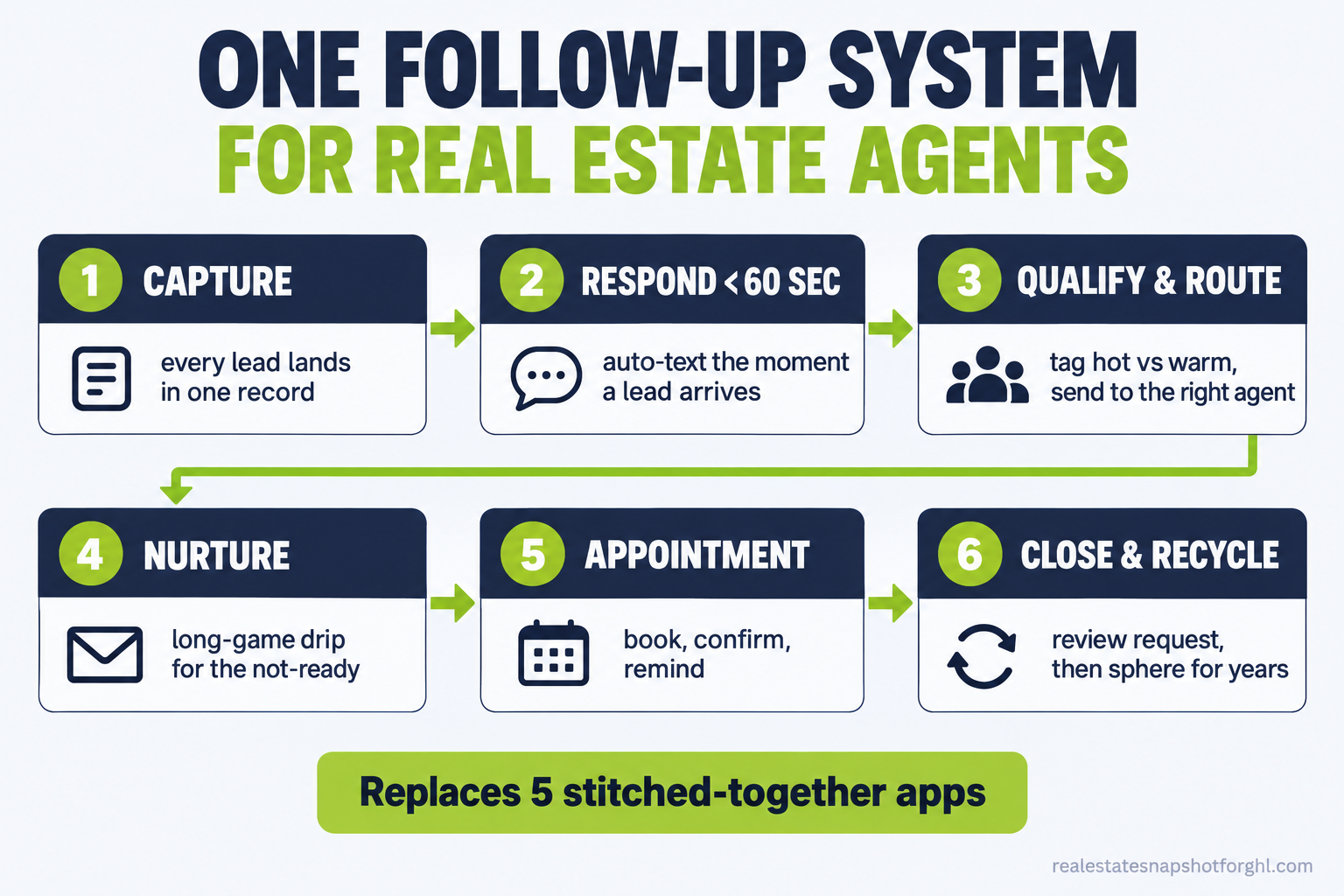
- Stage 1: One place every lead lands
- Stage 2: A response in under 60 seconds
- Stage 3: Qualify and route
- Stage 4: The long game for the not-ready
- Stage 5: Appointments and showings that happen
- Stage 6: Close, ask, and recycle
- Steal this: the message copy
- Run it for a solo agent, a team, and a brokerage
- Objections
- FAQ
What all these tools are actually costing you
Start with the number that runs this business: response time. The MIT and InsideSales study of 1.25 million leads found that reaching out within five minutes made an agent far more likely to connect and qualify a lead than waiting until the 30-minute mark (MIT Lead Response Management study). Not a little more likely. An order of magnitude.
Now put that next to how agents actually respond. Harvard Business Review’s audit found the average first reply to an online lead took 42 hours, and 23% were never contacted at all (HBR). That gap is not a motivation problem. It is plumbing.
And you did not skip the tools. You bought them. Agents report high adoption, with eSignature at 79%, social media at 75%, and AI use up to 68% (NAR 2025 Technology Survey). The issue is that a form fill in one app does not fire a text from another, so the window closes while everything you own sits idle.
Share of Realtors using each technology, NAR 2025 Technology Survey. High adoption spread across separate apps is exactly how a lead falls through a stack that never syncs. Source: NAR.
The market is not doing you favors either. Existing-home sales ran at a 3.98 million annual pace in August 2026, down 2.0% from the month before, with the median price at $429,100 (NAR). Fewer transactions means every lead matters more, and buyers still close with an agent (NAR 2025 Profile), so the ones you drop go to whoever answered first.
The six stages every lead moves through
Strip away the software names and every lead moves through the same six stages: capture, instant response, qualify and route, nurture, appointment, and close. Tool sprawl breaks each one predictably, and a single connected system closes each gap. Walk them and you will see where your stack is leaking.
Stage 1: One place every lead lands
What tool sprawl does to it. Zillow leads land in one inbox. Your website form emails a second. Facebook lead ads sit in a Meta dashboard nobody logs into. Your open house sheet is a photo on your phone. The lead exists, but no single place knows it, so nobody owns the next step.
The one-system setup. Point every source at one destination. Website forms, IDX lead capture, portal leads, social ads, and your call log all write to one contact record. If a source cannot deliver into the one inbox, it does not get used until it can.
How it breaks. The classic failure is a source that only supports email delivery. Email parsing is fragile, and a formatting change on their end silently stops the flow. Test every source with a fake lead once a month.
Stage 2: A response in under 60 seconds
What tool sprawl does to it. This is where the five-minute window dies. A lead comes in overnight or while you are at a showing, and the response waits until you next open the right app. By then it is hours and the buyer has talked to someone else.
The one-system setup. The moment a lead lands, an automated text goes out from your number, sounding like you. Not a portal auto-reply. A warm first line that opens a conversation and asks one question. If they called and you missed it, a missed-call text-back fires within seconds. For leads worth a live touch, an AI voice agent qualifies them while you are up a ladder.
How it breaks. If the text sounds like a robot, replies drop, so write it like a person and ask a question. And texting has rules now: you need proper consent and a registered sending setup, or your messages get filtered.
Stage 3: Qualify and route
What tool sprawl does to it. Every lead is treated the same because your tools cannot tell them apart. A ready-now buyer pre-approved for $500k gets the same nothing as someone browsing for next spring, because you have no tags and no scoring. So you call whoever you happened to see.
The one-system setup. The first reply asks a qualifying question about timeline, financing, or price range, and the answer tags the record automatically. Hot leads route to a human immediately with a task, and warm-but-not-now leads drop into a nurture track. This works because the same record holds the message, the tag, and the rule.
How it breaks. Over-tagging. Build 40 tags and you will maintain none. Start with four buckets: hot buyer, warm buyer, seller, and sphere, and add more only when a workflow needs one. Clean tagging is the difference between a CRM and a junk drawer, and I have cleaned up plenty of junk drawers.
Stage 4: The long game for the not-ready
What tool sprawl does to it. The not-ready lead is where the money leaks quietly. Most leads are not ready today, and most agents give up after a touch or two, so the six-month buyer buys with whoever stayed in touch. Your Mailchimp newsletter does not count, because it goes to everyone and speaks to no one in particular.
The one-system setup. A not-ready lead enters an automatic long-game track. Value first, ask second: a market update on their saved area, a new listing that matches, a check-in that invites a reply. The cadence stretches over months, and every reply pulls them back to a human. Your cold database reactivation and your sphere follow-up run on this same engine: one system, many tracks.
How it breaks. Set-and-forget rot. Nurture that never gets refreshed sounds stale, and stale is worse than quiet. Review the copy every quarter, kill any message that gets zero replies, and make sure a human reply always stops the machine so nobody gets a chirpy text the day after bad news.
Stage 5: Appointments and showings that happen
What tool sprawl does to it. The booking tool and the CRM are strangers. A showing gets requested in one place and never reaches the calendar the reminders run off, so it double-books, or the buyer shows and you do not. No-shows climb because nothing confirms between booking and the door.
The one-system setup. Booking, calendar, and reminders are the same tool. When a showing books, the record updates, a confirmation text goes out, and reminders fire the day before and the morning of. A quick “still good for 2pm?” the hour before catches flakes early. This is basic appointment automation, which only works when the calendar and messaging live together.
How it breaks. Time zones and buffers. A misconfigured calendar books two showings 20 minutes apart across the metro. Set buffers once, confirm the time zone, and test with a real booking first.
Stage 6: Close, ask, and recycle
What tool sprawl does to it. The deal closes and the system goes silent, because your tools have no idea a transaction happened. No review request goes out during the one week the client is thrilled. The client drifts, and 18 months later the next agent who calls gets the referral you earned.
The one-system setup. Closing triggers the last stage automatically. A review request goes out while the good feeling is fresh, routed so happy clients land on Google and unhappy ones reach you privately first. Then the client re-enters the system as sphere, with a light check-in every quarter for years. The full follow-up sequence feeds the next deal.
How it breaks. Asking for the review at the wrong moment, or asking the client whose closing was a nightmare. Gate the ask behind a private “how did we do?” so you catch the one-star before it goes public.
Steal this: the message copy
The software is replaceable. The copy is the asset. Write these once, keep them in one system, and they run forever.
Missed-call text-back (fires within seconds of a missed call):
Hi [First name], this is [Your name] with [Team]. Sorry I missed you, I was with
a client. Are you calling about a specific listing, or looking to start your
search? I can help right here by text if that's easier.
Speed-to-lead sequence (new online lead, fires automatically):
Minute 0 (text):
Hi [First name], it's [Your name], [Team]. Got your request on [address /
"the search you saved"]. Quick one so I point you the right way: hoping to be in
a place by a certain date?

Minute 5 (text, if no reply):
No rush. Want me to send a few that match, or would a quick 10-minute call be
easier? Happy to work around your schedule.

Hour 1 (email):
Subject: About [address / your home search]
[First name], here's what I'd suggest as a first step: [one specific thing].
Reply here or text me at [number] anytime, days or evenings.

Day 3 (text):
Last note so I'm not a pest: I'll keep an eye out and send anything strong that
hits the market in [area]. If now's not the time, just say the word.
Not-ready nurture (monthly, value first):
Hi [First name], [neighborhood] update: [X] homes sold last month, median around
[$]. Prices in your range have been [holding / softening]. Want the three best
active listings that fit what you told me? No pressure either way.
Review request (fires after close, happy path):
[First name], congratulations again on [address]. It meant a lot to work with
you. If you have 60 seconds, a quick Google review helps another family find me
the way you did: [link]. And if anything fell short, tell me first, I'd rather
fix it.
Quarterly sphere check-in (past clients, for years):
Hey [First name], no agenda, just thinking of you. How's the house treating you?
If you ever need a contractor referral or you're curious what [street] is worth
these days, I'm a text away.
That block is about ten minutes of setup and it is the difference between a system that follows up and a stack that forgets. If you want these already wired into workflows, that is what our done-for-you install delivers.
Run it for a solo agent, a team, and a brokerage
The six stages do not change. The routing does.
Solo agent, roughly $60k to $120k GCI. The system’s job is to protect the five-minute window when you cannot answer. Automate stages 2, 4, and 6 hard: the instant text-back, the long-game nurture, and the review-and-sphere loop. Route hot leads to your phone and keep qualifying light. A lead never waits on you being free.
Two-to-three-person team. Routing is the point. A missed lead is an argument about whose lead it was. Round-robin hot leads to whoever is up, with a fallback so an unclaimed lead bounces to the next agent within minutes. Shared tags let anyone pick up a conversation, killing the “I thought you had it” problem.
Five-seat team or small brokerage. Here the leak is invisible until you measure it, and a stitched stack quietly bleeds money: five agents times four or five subscriptions, none syncing, plus the leads that fall between them. One system gives you speed-to-lead you can enforce, routing you can audit, and reporting that shows which source and agent convert. Our breakdown of what real estate CRM software really costs in 2026 does the math per seat.
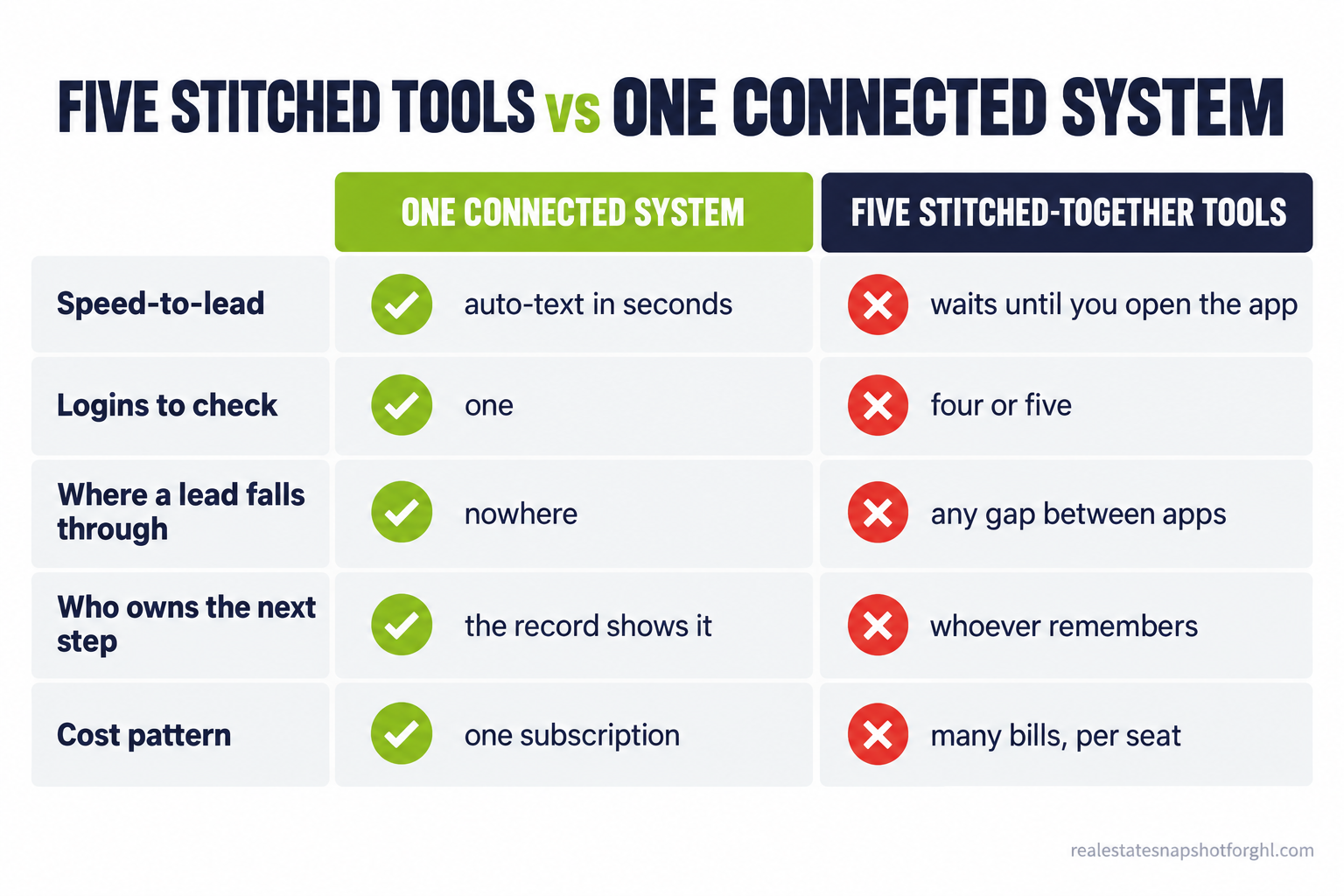
Five stitched tools vs one connected system
| One connected system | Five stitched-together tools | |
|---|---|---|
| Speed-to-lead | Auto-text in seconds, any hour | Waits until you open the right app |
| Logins to check | One | Four or five, several times a day |
| Where a lead falls through | Nowhere, it is one record | Any gap between two apps |
| Who owns the next step | The record shows it | Whoever remembers, if anyone |
| Cost pattern | One predictable subscription | Many bills that grow per seat |
Objections
“Won’t an automated text feel robotic and annoy people?” It feels robotic when it reads like a form letter, and human when it uses their name, references what they asked about, and ends with a real question. The messages above sound like a busy agent firing off a quick text, which is what a buyer expects at 11pm. The alternative is not a warmer touch, it is silence for 42 hours, and silence is what actually annoys people (HBR).
“I already pay for Follow Up Boss. Do I have to rip it out?” Not on day one. Many teams run a system like this alongside an existing CRM while they move over, and Follow Up Boss starts at $69 per user per month, which adds up fast across a team (Follow Up Boss pricing). The honest question is not “can I keep it,” it is “am I paying for a tool whose main job, follow-up, still is not happening?” Then cancel the overlap.
“I am not technical. Won’t one big system be harder?” One system is fewer things to learn, not more. Right now you are the integration layer, holding five apps together in your head. A done-for-you install arrives with the workflows, copy, and routing already configured. Low-to-mid tech comfort is exactly who this is for.
“Is texting leads even legal now?” It is, with consent and setup. You need express written consent, and you must honor opt-outs and the Do Not Call rules (FCC). Business texting in the US now requires a registered A2P 10DLC campaign or carriers filter your messages (The Campaign Registry). One system makes this easier, because consent, opt-outs, and registration live in one place. Our SMS compliance guide has the details.
Back to that Tuesday. In the one-system version, the overnight lead got a warm text at 11:04pm, replied by 11:20, and is tagged as a hot buyer with a showing already confirmed on your calendar. You open one tab, not six, and see a conversation halfway to an appointment. That is not more software. It is less.
FAQ
How many tools does a real estate agent actually need?
One that covers the whole lead journey: capture, texting, calling, calendar, email, and pipeline in a single record. Agents adopt many separate apps (eSignature adoption alone runs 79%), but the ones that matter for follow-up should live together so a lead cannot fall between them (NAR 2025 Technology Survey). Specialty tools like your MLS can stay separate. Your follow-up should not.
Why do I lose leads even though I pay for a CRM?
A CRM that only stores leads is not a system that follows up. If it does not fire an instant text, route the lead, and run the nurture on its own, follow-up still depends on you opening the app in time. Contacting a lead within five minutes versus 30 makes you far more likely to reach and qualify them (MIT/InsideSales).
Can I keep my current tools and just connect them?
Sometimes, with integrations between apps, but every connection is one more thing that can silently break. Email-parsed lead delivery in particular fails quietly when a source changes its format. Consolidating removes the connections instead of maintaining them, which is why it is more reliable, not just cheaper.
What is the fastest thing I can fix this week?
Stage 2. Turn on an automated text-back for missed calls and new form fills so every lead gets a human-sounding reply in under a minute, any hour. It is the highest-payoff change because it attacks the response-time gap that costs the most deals, and the copy is above, ready to paste.
Will consolidating tools actually save money?
Usually, once you count the overlap. A CRM, a dialer, a scheduler, and an email tool stack up fast, and Follow Up Boss alone starts at $69 per user per month (Follow Up Boss). Across a team, per-seat subscriptions multiply. One system often replaces several bills, but the bigger saving is the leads you stop dropping.
Is automated texting compliant with 2026 rules?
Yes, when you get express written consent, honor opt-outs and Do Not Call rules (FCC), and register an A2P 10DLC campaign so carriers deliver your messages (The Campaign Registry). Managing that in one system is simpler than tracking it across several apps.
Devin Callahan writes about GoHighLevel implementation and keeping a real estate CRM from turning into a junk drawer. This is educational content for real estate professionals, not legal or compliance advice. Texting and Do Not Call rules change, so confirm current requirements with the FCC and your broker before you launch outreach.